
Article 50(5) of the EU AI Act requires a disclosure that is clear, distinguishable and accessible. Under the Commission's Code of Practice, the main element is the capitalised acronym “AI”, visible at once without a click, in a place without overlapping elements such as the top right corner, spaced from other overlays and recognisable against any background (Measures 1.1 and 1.2).
A short text such as “AI-generated” or “AI-modified” next to the “AI” makes the label clearer.

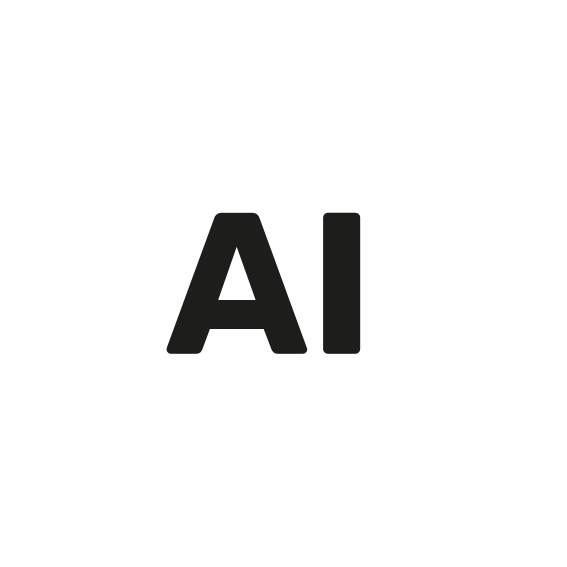 AI-generated
 AI-modified
What the law requires and what the Code adds
Article 50(5) of the EU AI Act calls for clear, distinguishable and accessible information at the latest at first exposure. According to the guidelines, clear means noticeable, easy to understand and accessible; distinguishable means identifiable as separate from other information and from its surroundings (para. 142). The Code of Practice sets out the details in Section 2, Commitment 1. Under the Code, its “will” measures need to be met to comply with Article 50(4) and (5), and market surveillance authorities will monitor them. Non-signatories compare themselves against them in a gap analysis (para. 148).
The main element: “AI”
“The icon or equivalent label will comprise, as the main visual element, the capitalised acronym ‘AI’ in the English language (e.g., an ‘AI’ icon), unless use of English is incompatible with applicable national laws on the use of languages in commercial or administrative matters in which case the acronym may be disclosed in the national language. The letters in the acronym will have the same vertical dimension. If resized, the proportions of the letters must be preserved.”
Code of Practice, Section 2, Measure 1.1 a
In France, the Loi Toubon may rule out English, in which case a local equivalent such as “IA” is possible. Germany has no general rule requiring German in advertising, so “AI” remains the main element there. A label that drops “AI” departs from the Code and would have to be justified in a gap analysis.
The Code also encourages saying whether content was generated or modified, and what was modified, in a second layer (Measure 1.1 b). In the Commission's user tests, versions with a clear text such as “modified” were noticed and understood significantly better (Code, Annex 1).
Adding a short text
In German-speaking markets, the Wettbewerbszentrale (German Centre for Protection against Unfair Competition) recommends German terms when in doubt, especially for audiences less familiar with technology. “AI” plus a short local text meets both the Code and that advice.
| Situation | English | German |
|---|---|---|
| Image fully generated with AI | AI-generated | KI-generiert |
| Photo partly modified with AI | AI-modified | Mit KI verändert |
The EU icons page advises plain language and no abbreviations other than “AI” in accompanying text, so write out “artificial intelligence” in the second layer and in the accessible name for screen readers. Where children are part of the audience, the guidelines expect notices in the official language of the Member State (para. 142, footnote 40).
Placement
- Recognisable at once, without interaction or sustained attention (Sub-measure 1.2.1 a).
- Visible long enough to be noticed under normal conditions (1.2.1 b), which for a still image means for as long as the image is on screen.
- Perceivable no later than first exposure, with enough space to other overlays and visible against any background (1.2.1 d).
- In a place with no intervening overlay elements, for example the top right corner (Sub-measure 1.2.2 a). If your theme puts a wishlist heart or a sale badge there, another corner with some spacing is better than an overlap. Leave controls such as gallery arrows or zoom free.
Size
Neither the AI Act nor the Code sets a minimum size. The Code allows different sizes depending on context, as long as the disclosure stays clear and distinguishable (Measure 1.1 c), and the EU icons page asks for a clearly visible size. As a guide, we recommend:
| Surface | Label height |
|---|---|
| Main image, zoom, banners, blog | 24 px, with text |
| Product cards | 20 px, text from about 160 px card width |
| Thumbnails from 48 px, cart | 14 px, “AI” only |
| Thumbnails under 48 px, swatches | no label on the image; the large image on the same page carries it |
The full list of store surfaces is in AI images in online stores.
Contrast and accessibility
Under Article 50(5), the information must meet the accessibility requirements that apply anyway; Article 50 adds none of its own (para. 144). The Code separately requires high-contrast labels, screen reader compatibility and detectability by assistive technologies (Measure 1.1), and encourages applying WCAG 2.1.
- Text contrast of at least 4.5:1 between “AI” and its background (WCAG 1.4.3). White on black reaches 21:1.
- Contrast of at least 3:1 between the label and the image next to it, using a border if needed (WCAG 1.4.11). Colour is never the only distinguishing feature (1.4.1).
- An accessible name such as “AI-generated. This image was generated with artificial intelligence.” The label follows the image directly in reading order and is not hidden from screen readers.
- A second layer that meets WCAG 1.4.13: reachable by keyboard, dismissible with Esc, hoverable with the mouse, and open until closed.
Overlay or burned in
The Code says the label is embedded directly in the content unless an equivalent alternative exists, such as a user interface overlay that appears to be on the content (Sub-measure 1.2.1 c). For onward distribution, it asks for best efforts. The EU icons page says more briefly that the icon must stay visible when content is reshared or downloaded, but it describes itself as a summary of the Code text, which governs. The question is not fully settled.
| Overlay in the store | Burned into the file | |
|---|---|---|
| Image file | unchanged, metadata preserved | rewritten; an existing C2PA manifest becomes invalid |
| Size and sharpness | always sharp, same size on every surface | scales with the image, often tiny on cards and in checkout |
| Cropping | always within the visible area | may be cut off on cropped cards |
| Changes | at any time, no new file | only via the saved original |
| Outside the store | does not travel (feeds, downloads, emails) | travels with the file |
In practice you use both, an overlay in the store and a burned-in version for Google Shopping, Meta, newsletters and marketplaces. Keep the original and leave some margin; Google advises against the outermost corners. The free labelling tool creates an example in your browser.
The second layer
A click or tap on the label can open a second layer that says what the AI changed (Measure 1.1 b). Sample wording:
- Fully generated: “AI-generated image. This image was entirely generated with artificial intelligence (AI). It is not a photograph.”
- Partly modified: “AI-modified image. This photo was modified with artificial intelligence (AI). Modified: the background. Unchanged: the product.”
- AI model: “The person shown was generated with AI.”
“Unchanged: the product” is a statement of fact; only use it if it is true. More wording is available in the disclosure text tool.
What does not work
- Soft wording such as “AI-enhanced”, “AI-assisted” or “AI-optimised”. What must be disclosed is that the content was artificially generated or manipulated (Article 50(4)); the label informs about artificial origin, not about quality or trustworthiness (Code, Section 2, recital a).
- “Illustrative image” as a substitute. It does not say that AI was involved.
- An “i” icon only that reveals “AI” on hover (Sub-measure 1.2.1 a).
- Fading out after a few seconds, or a close button on the label.
- Alt text only. It helps screen reader users as an extra, but sighted visitors do not see it.
- Recoloured or distorted EU icons. If you want other colours, build an equivalent label of your own that follows the same rules (see EU AI icons).
Frequently asked questions
How big does an AI label have to be?
Neither the EU AI Act nor the Code of Practice sets a minimum size (Code, Measure 1.1 c). We recommend a height of 24 px on large images, 20 px on product cards and 14 px on thumbnails.
Where should the AI label be placed?
On the image, in a place without overlapping elements, for example the top right corner (Sub-measure 1.2.2 a).
Can I use my own language instead of “AI”?
Only where national language law makes English incompatible (Code, Measure 1.1 a). A short local text next to the “AI”, such as “KI-generiert” in German, helps.
Do I have to use the EU icon?
No, the EU icons are optional. You can also use an equivalent label of your own that follows the Code's rules (Code, Section 2, Commitment 1).
Is a label that only appears on hover enough?
No. The “AI” must be recognisable at once without any interaction (Sub-measure 1.2.1 a; guidelines, para. 117).
Can I match the AI label to my store's colours?
Yes, as long as it stays clear, accessible and distinguishable and the contrast holds (Code, Measure 1.1 c). Do not recolour the EU icons themselves.
Sources
Para. refers to the paragraph number in the European Commission's guidelines on Article 50, C(2026) 5054.
- Regulation (EU) 2024/1689 (AI Act)EUR-Lex · Law · 12 Jul 2024
- Commission Guidelines on the transparency obligations under Article 50 AI Act, C(2026) 5054 finalEuropäische Kommission · Commission · 20 Jul 2026
- Code of Practice on Transparency of AI-Generated Content (final version)Europäische Kommission · Code of practice · 10 Jun 2026
- EU icons for labelling AI-generated contentEuropäische Kommission · Commission · 24 Sept 2026
- W3C, Web Content Accessibility Guidelines (WCAG) 2.1W3C · Standard · 5 Jun 2018
- Wettbewerbszentrale, guide on labelling AI-generated content, version 2.0Wettbewerbszentrale · Association · 29 Jul 2026
- Google Merchant Center: AI content label settings and disclosuresGoogle · Platform · 3 Oct 2026